
Categories: Windows
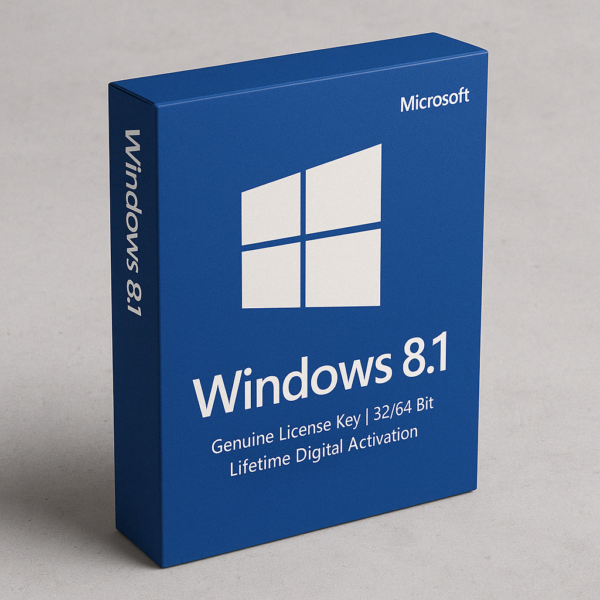
Windows 8.1 License Key – Lifetime Activation
₹340Approximately $4 (USD)
What You Receive
-
✅ Genuine Windows 8.1 License Key
-
✅ Supports both 32-bit and 64-bit versions
-
✅ ISO download link for installation
-
✅ Step-by-step activation guide
-
✅ Lifetime digital activation – no expiry
-
✅ Global compatibility (except Macs)
Windows 8.1 offers a perfect blend of performance, reliability, and an intuitive user experience for both personal and professional use. Designed to improve upon the innovations introduced in earlier editions, Windows 8.1 refines the operating system with better customization, smoother multitasking, and enhanced system stability. Whether you are managing work, studies, or daily activities, Windows 8.1 provides a familiar yet powerful platform that meets diverse computing needs with long-term reliability.
Ideal for users who prefer a balance between a modern interface and traditional functionality, Windows 8.1 remains a dependable choice for smooth and efficient digital experiences across a wide range of devices.
Why Windows 8.1 Remains a Trusted Choice 🌟
✨ Intuitive User Interface
With a smart combination of the classic desktop view and the updated Start screen, Windows 8.1 allows users to transition smoothly between touch and traditional navigation. 🖥️🎯
✨ Enhanced Multitasking
Snap up to four apps side by side, adjust window sizes dynamically, and boost your productivity with improved multitasking capabilities. 📂🔄
✨ Stronger Security Features
Built-in protections like SmartScreen filters, Windows Defender, and BitLocker encryption safeguard your data and keep your system secure. 🔒🛡️
✨ Customization and Personalization
Personalize your Start screen with live tiles, custom colors, and backgrounds, allowing you to create a computing environment that truly feels your own. 🎨🧩
✨ Cloud Connectivity
Easily integrate with cloud storage solutions like OneDrive for seamless file access and synchronization across devices. ☁️🔗
Designed for a Variety of Users 🏢🎓
🏢 Small and Medium Businesses
Support business applications and employee workflows with a secure, stable, and user-friendly operating system.
🎓 Students and Educators
Facilitate research, learning, and project management with essential tools and a familiar desktop environment.
🏡 Home Users and Enthusiasts
Manage everyday tasks like browsing, entertainment, and communication with an easy-to-use and visually appealing interface.
🎮 Gamers and Multimedia Users
Enjoy compatibility with a wide range of games, streaming services, and media applications for both work and leisure.
Performance Enhancements for Everyday Use 🚀⚙️
Windows 8.1 brings meaningful performance improvements that optimize both old and new hardware:
-
Faster Boot Times: Enjoy quicker start-ups compared to older operating systems. 🔧
-
Efficient Resource Management: Improved memory handling and background app management ensure smooth multitasking. 📊
-
Battery Optimization: Better energy efficiency extends battery life on portable devices. 🔋
-
Touch and Gesture Support: Seamless interaction with touchscreen devices for a more modern computing experience. 📱
These enhancements create a smooth, responsive, and enjoyable experience across various tasks and workloads.
Reinforced Security for Peace of Mind 🛡️🔐
Windows 8.1 strengthens your system against threats with comprehensive security features:
-
Windows Defender: Provides real-time protection against viruses, spyware, and malware. 🛡️
-
SmartScreen Technology: Blocks suspicious downloads and websites, keeping your browsing experience safer. 🌐🔒
-
BitLocker Encryption: Encrypts your drives to protect your important data against unauthorized access. 💾🔐
-
Automatic Updates: Regular security patches and system updates ensure your device stays protected over time. 🔄
This robust security architecture helps maintain the integrity and privacy of your personal or business data.
Smarter Personalization and Cloud Integration 🎨☁️
Windows 8.1 allows users to personalize their experience more than ever before:
-
Customizable Start Screen: Adjust the layout, color schemes, and tile sizes to suit your style. 🎨
-
Background Synchronization: Keep settings, apps, and themes synchronized across multiple devices using cloud connectivity. ☁️
-
Deep SkyDrive (OneDrive) Integration: Store files securely in the cloud and access them from any device, anywhere. 📂🌍
These features enhance user convenience and offer a more cohesive and customized computing environment.
Modern Apps and Compatibility 📦🛠️
Stay productive and entertained with a wide range of applications available on the platform:
-
Windows Store Access: Download and install various modern apps designed for productivity, entertainment, communication, and education. 🛍️
-
Broad Hardware Compatibility: Supports a wide range of printers, scanners, external storage devices, and other peripherals. 🖨️🖱️
-
Legacy Software Support: Continue using older essential applications without compatibility concerns. 💼
Windows 8.1 successfully bridges modern computing needs with legacy support, making it an extremely versatile operating system.
Lifetime License, Long-Term Stability 📅🏛️
Choosing Windows 8.1 with a lifetime license ensures peace of mind for years to come:
-
Lifetime Validity: Install once and use indefinitely without worrying about renewals or additional costs. ✅
-
Stable Updates: Receive important system and security updates, ensuring optimal performance and safety. 🔄
-
Reliable Operation: Designed for long-term use across both older and newer hardware setups. ⚙️
It’s an investment into a solid, proven platform that continues to deliver consistent and dependable results.
There are no reviews yet.
Recently Viewed
Quick View
Wishlist
Compare
Quick View
Wishlist
Compare
Quick View
Wishlist
Compare
Quick View
Wishlist
Compare
Quick View
Wishlist
Compare